This page will guide you through the 2026 CLE application process and other important details.
Here’s what you’ll find inside:
Whether you’re a first-time taker or a retaker, we’ve made this guide simple and easy to follow. Let’s get started!
Are you ready to learn how to apply for CLE?
CLE 2026 Application Process
Follow these simple steps to apply for the CLE 2026! We recommend reading through the process first, and don’t worry — we included pictures for each step to make it even easier.
Step 1. Register with the PRC online portal (LERIS)
To apply for the exam online, you’ll need to create a LERIS account first.
Before you get started, ensure you have the following:
- An Internet connection and a web browser
- A valid e-mail address (with password)
- Mobile number
- Your personal data (including date of graduation)
- A valid ID card (e.g., NBI clearance, Police clearance, Philippine passport, Philippine Postal ID, etc.)
- A 2×2 ID photo in .jpg format saved on your device (desktop, laptop, phone, or tablet). If you’re getting your picture taken at a studio, ask for an e-file or soft copy in .jpg format. For the photo requirements, refer to step 3 of this guide.
Go to the PRC Online Services (LERIS) website and register. If you already have a LERIS account, skip this step and jump to the next.
After reading the terms of services, click the green “I Agree” button.
Then, complete the registration process by filling out the form with the required details.
When you’re done, click “Register.”
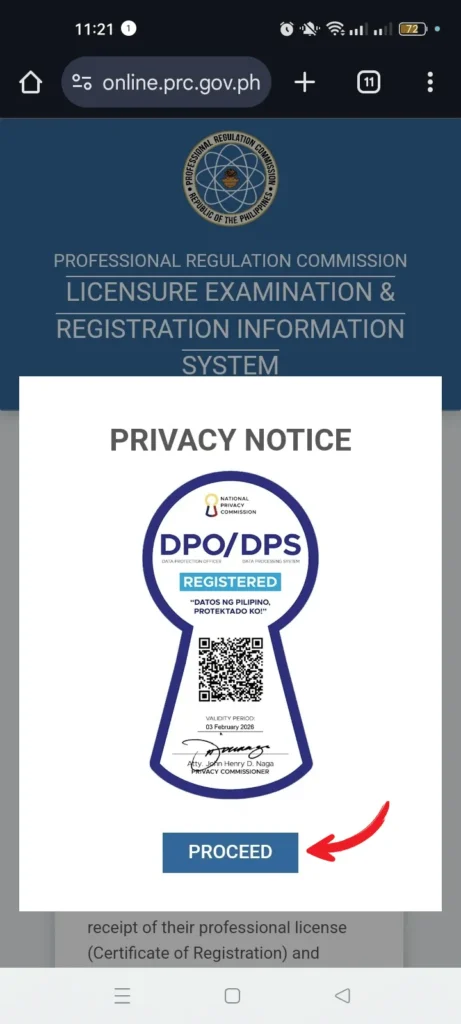


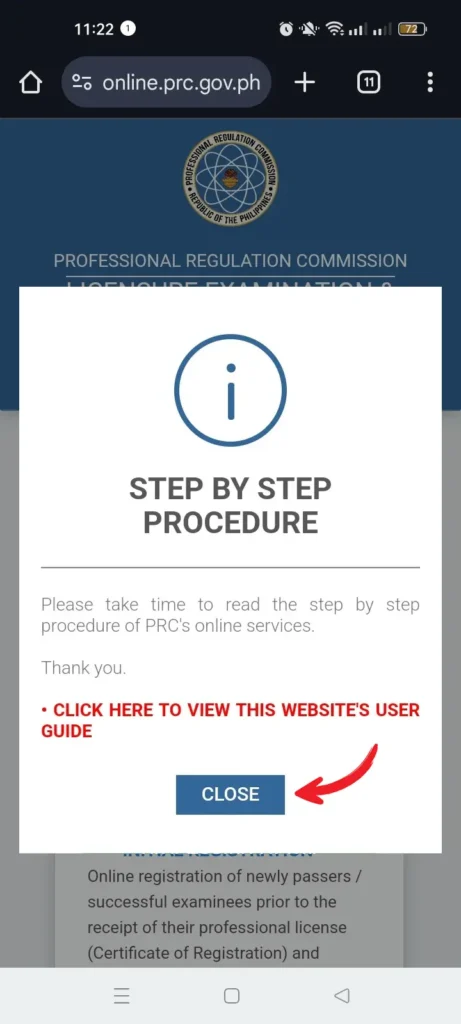
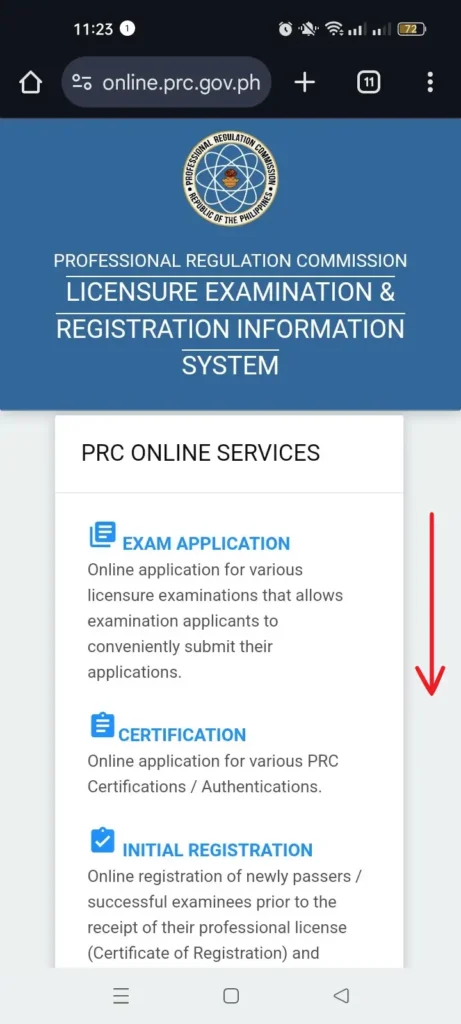
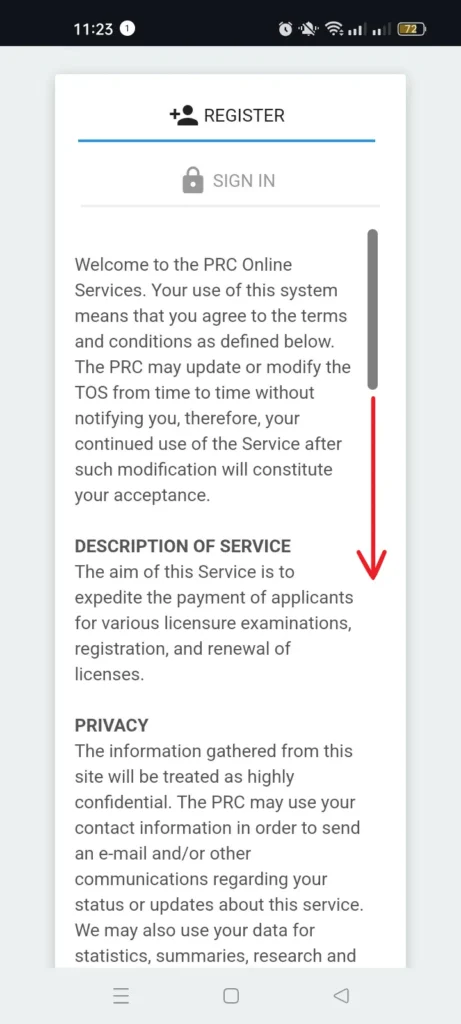
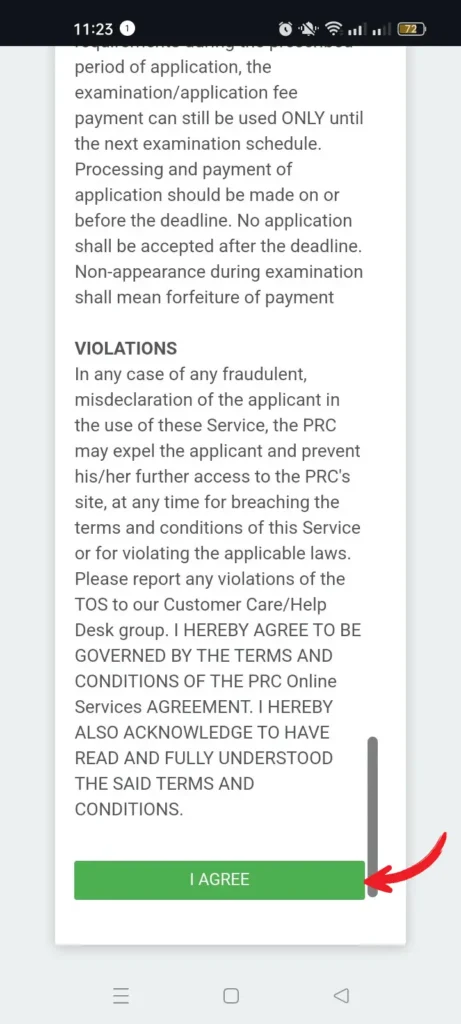
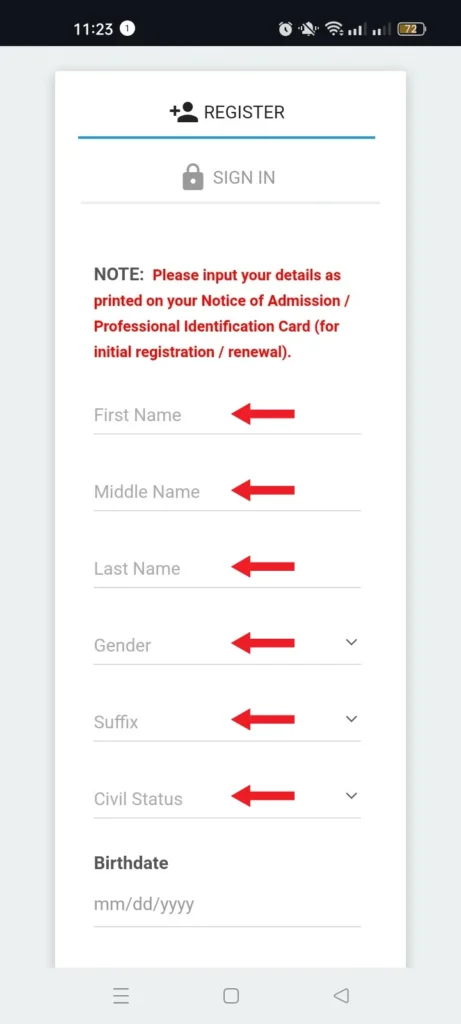
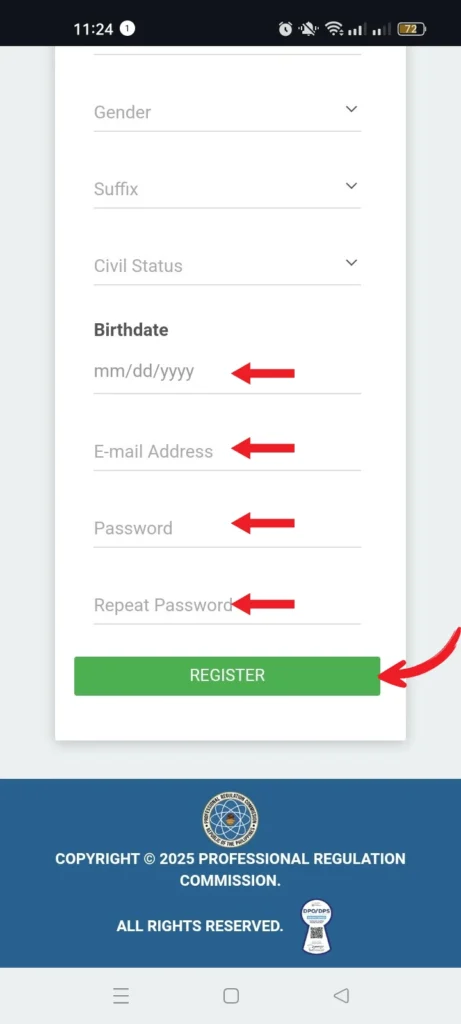
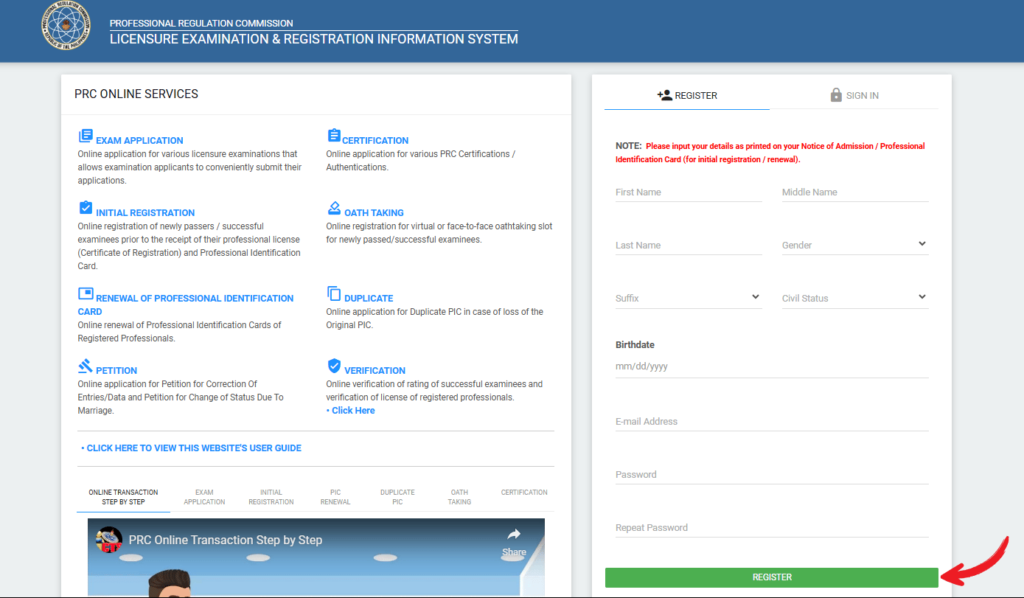
*Phone User: Swipe left to see the next photo
*Computer User: Click the arrow to see the next photo
Step 2. Sign in to your account and complete your online profile
Log in with the same username (your email address) and password you set up during registration.
Below the “Valid ID” section, there’s a box that says “Check if this is for PRC ID Renewal.” Since you’re applying for the licensure examination, leave this box unchecked.
Fill out the required details in the provided fields to complete your profile.
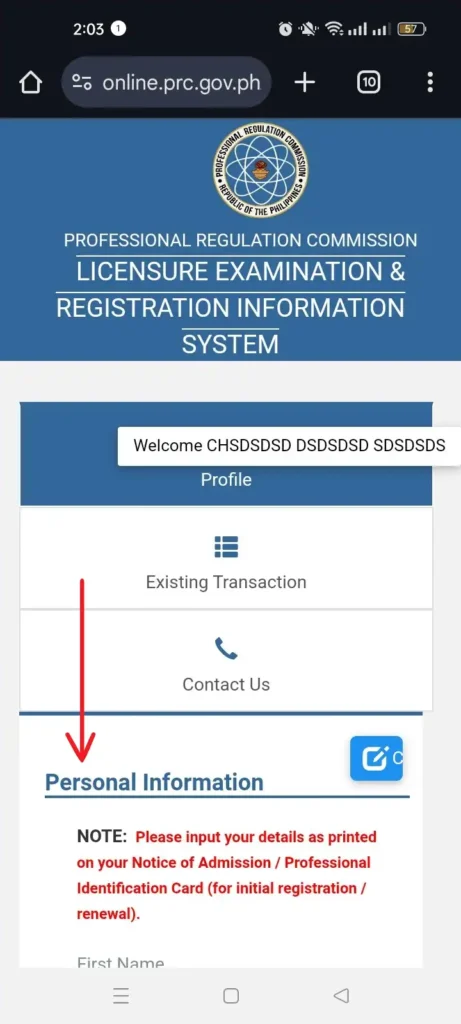
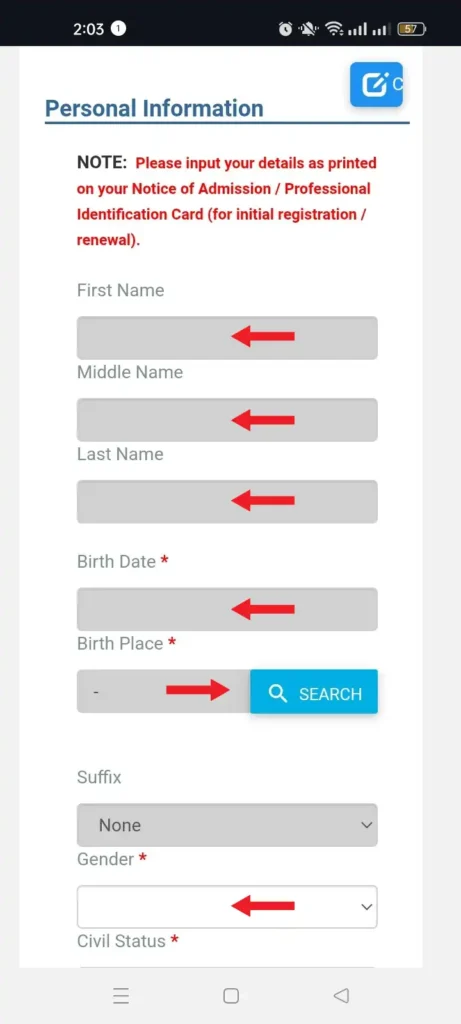
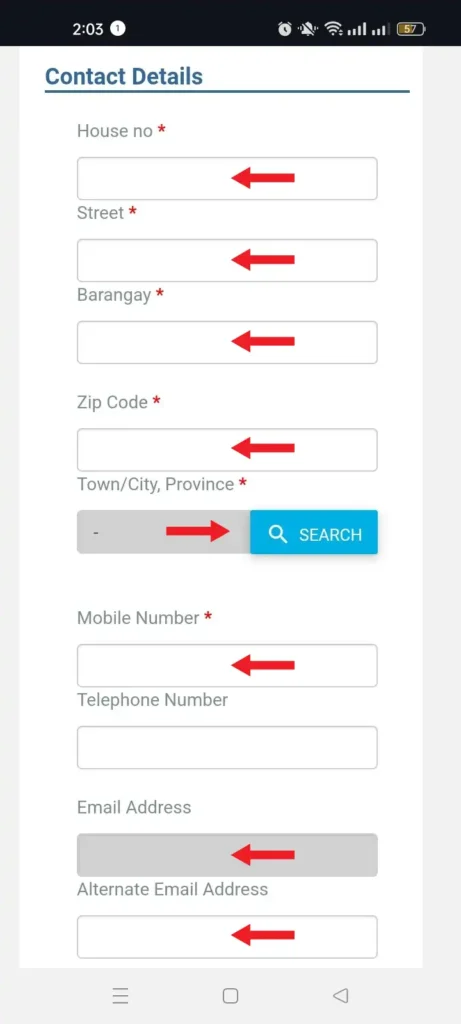
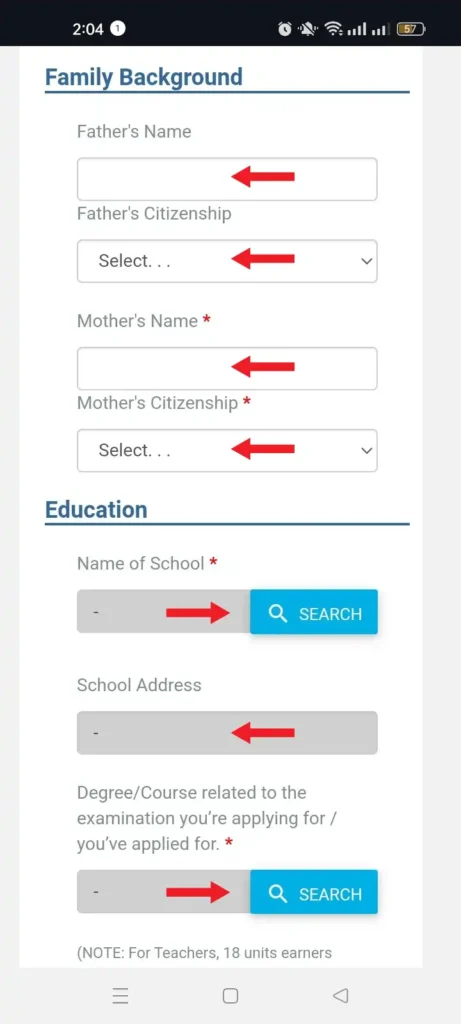
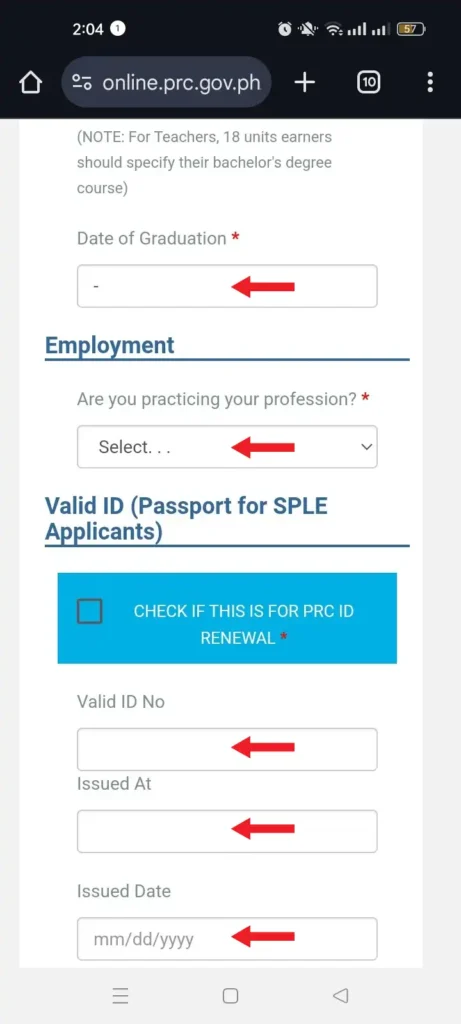

*Phone User: Swipe left to see the next photo
*Computer User: Click the arrow to see the next photo
Double-check the information you’ve provided and correct any spelling or syntax errors.
Once you’re done, click “Save Information” to proceed to the next step.
A small box will then appear asking you to verify if the name you’ve provided is complete and accurate.
Click “YES” to confirm.
Step 3. Upload your photo
You will be taken to a page containing a small grey box with a camera icon on its bottom left corner.
Click this camera icon to show the photo requirements you need to adhere to.
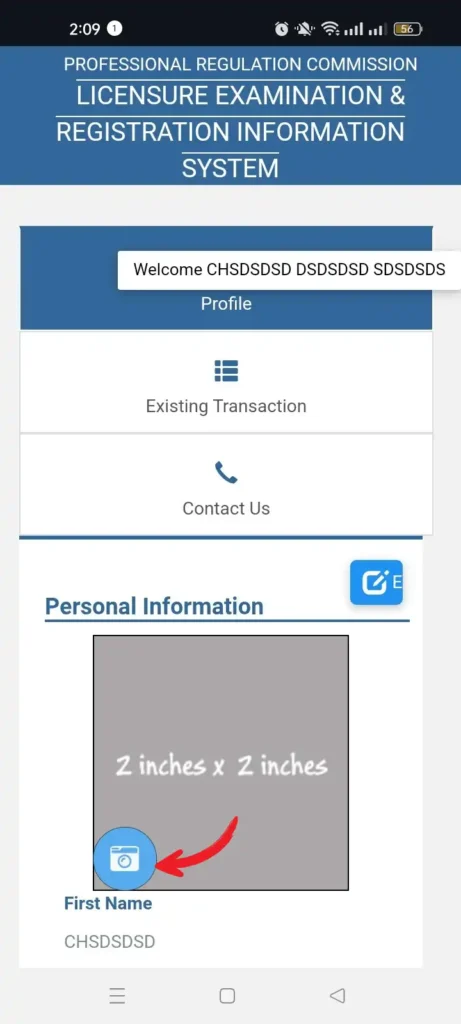
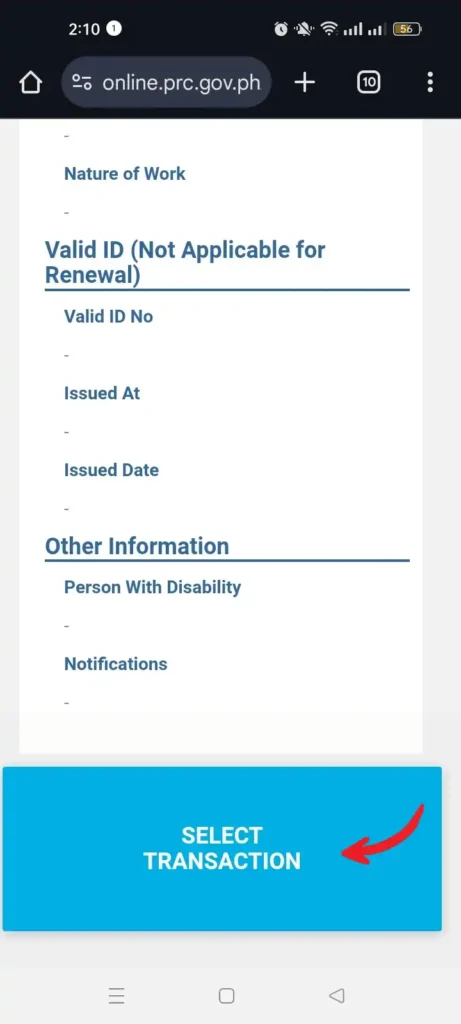
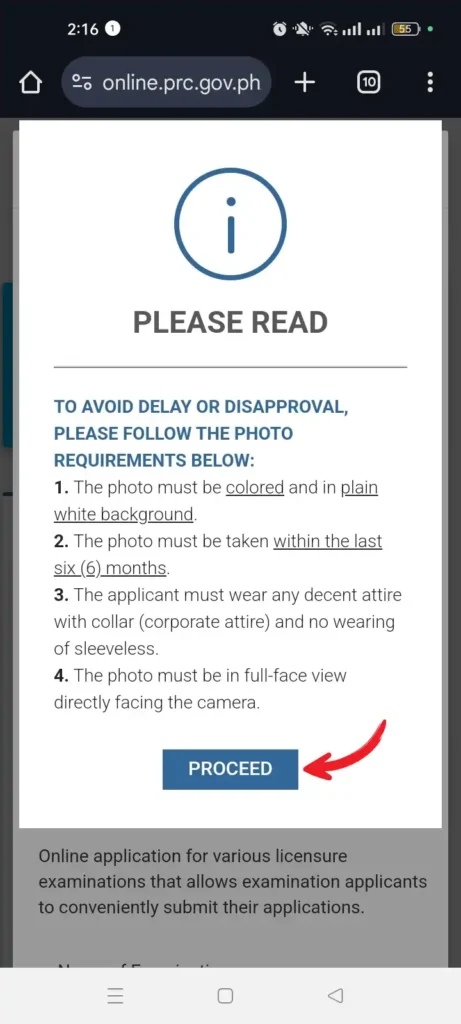
*Phone User: Swipe left to see the next photo
*Computer User: Click the arrow to see the next photo
To prevent any delay or disapproval, make sure that the 2 x 2 ID picture you’ll be uploading follows the guidelines below:
- 2 x 2 size in a plain white background.
- Must be recent and should resemble the applicant.
- Taken not more than 6 months prior to uploading.
- The applicant must wear decent attire with a collar.
- Must show the applicant’s ears.
- Must not show any shadow.
- The applicant must not wear eyeglasses.
If you’re ready to upload the picture, click “Proceed.”
Click “Choose file” and select the image stored in your device.
Finally, click the “Upload Image” button to proceed to the next step.
Then lastly, click the “Select Transaction” then “Proceed”
Step 4. Select the licensure examination you’re applying for
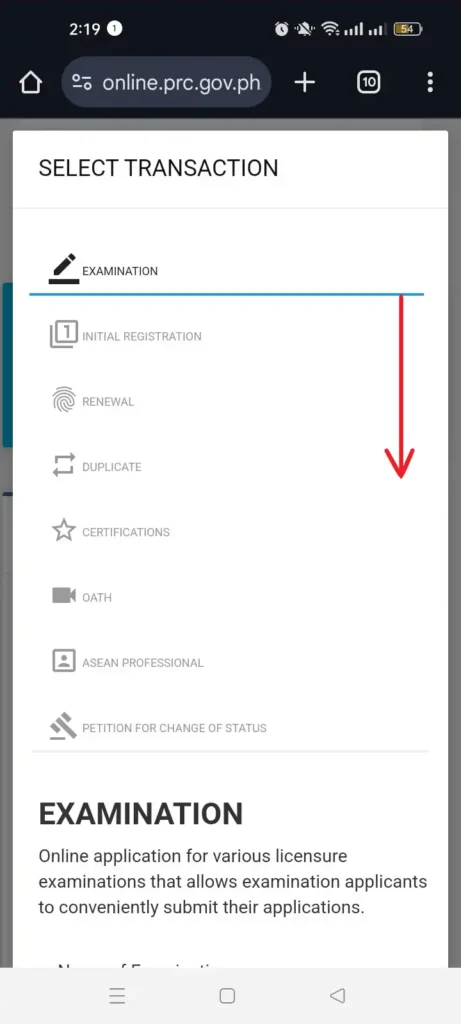
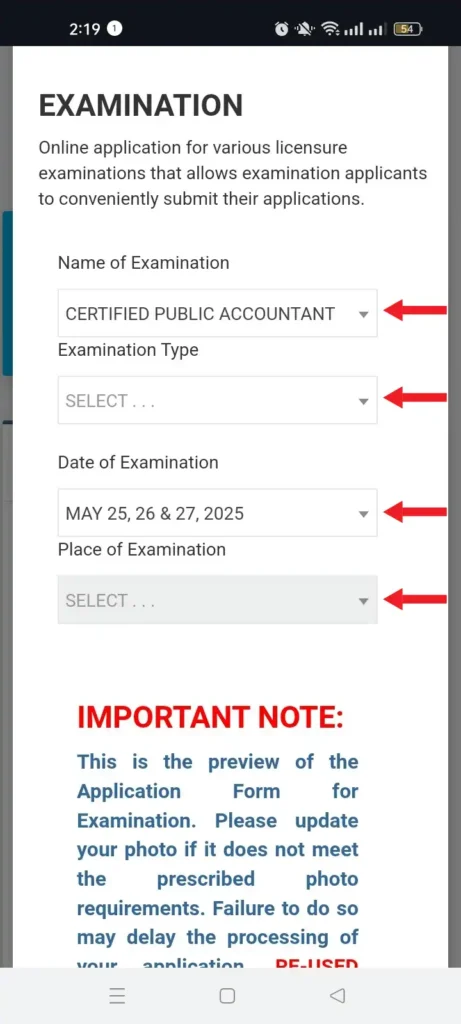
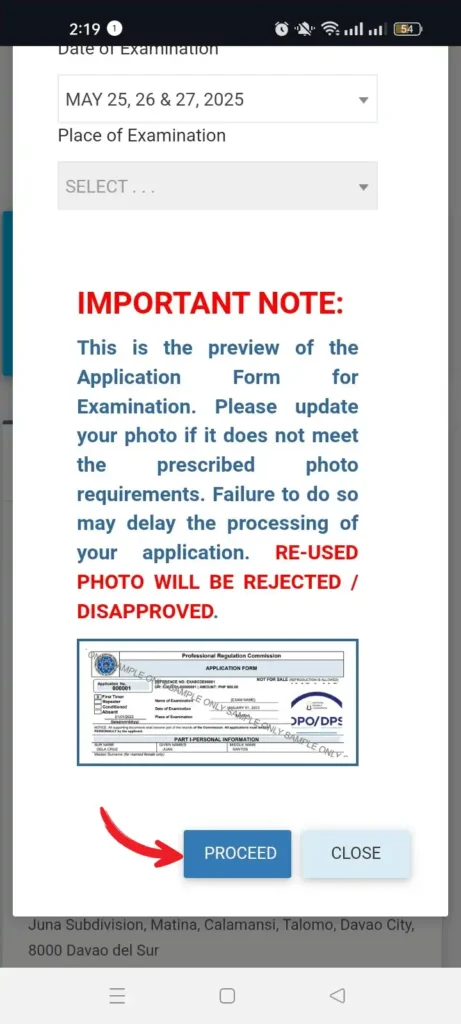
*Phone User: Swipe left to see the next photo
*Computer User: Click the arrow to see the next photo
Choose the first tab (i.e., “Examination”).
Next, select the name of your examination, examination type (Complete/First-timer, Repeater, or Removal/Conditioned), date of examination, and place of examination.
For example, if you’re an accounting student who is applying for CPALE (licensure examination for certified public accountant) for the first time, you need to input the following information:
- Name of the Examination: CERTIFIED PUBLIC ACCOUNTANT.
- Examination Type: Complete/First timer.
Once you’re done, hit “Proceed” to confirm the selection.
Step 5. Schedule an appointment with the PRC
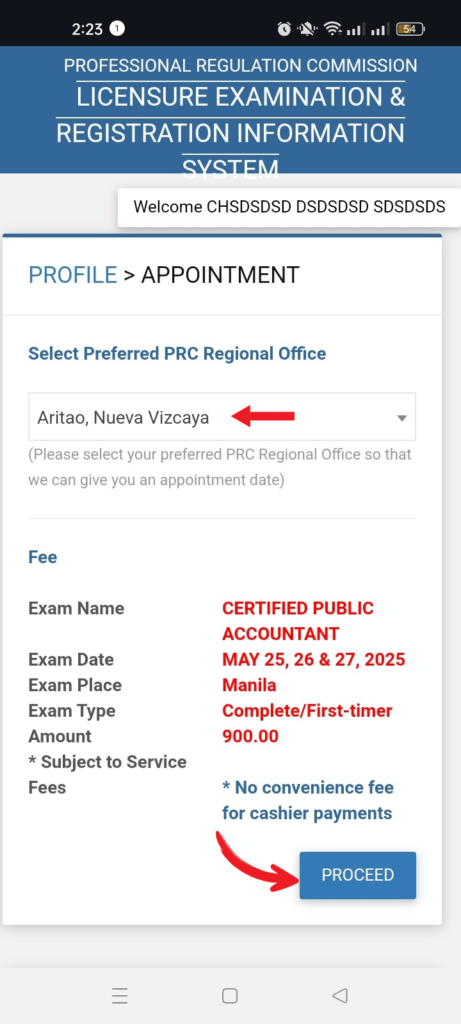
*Phone User: Swipe left to see the next photo
*Computer User: Click the arrow to see the next photo
Choose your preferred PRC Regional Office where you’ll file your application.
Here’s a list of PRC Regional Offices you can choose from.
To accommodate more applicants, PRC has also opened different service centers in select malls and establishments.
After choosing a PRC Regional Office from the drop-down list provided, the system will automatically provide you with an appointment date and time. This is when you’ll personally submit the application form along with other requirements (see step 1) to the PRC.
Take note that PRC has a “no same-day appointment” policy which means you can’t have an appointment with the PRC on the same day of your online transaction. All appointments are scheduled in advance.
Also, remember that appointment slots are free and very easy to get as long as you have an Internet connection.
PRC warns applicants against fixers who may ask for your personal information, e-mail address, and password and promise quick transactions with the PRC in exchange for a fee.
If you’re sure about your appointment, click “Proceed.”
Step 6. Choose your preferred payment method
Gcash as example*
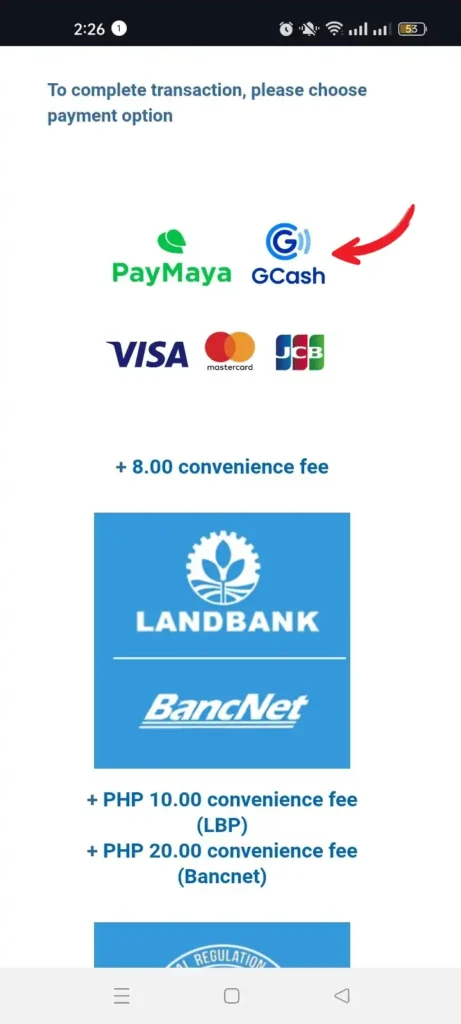
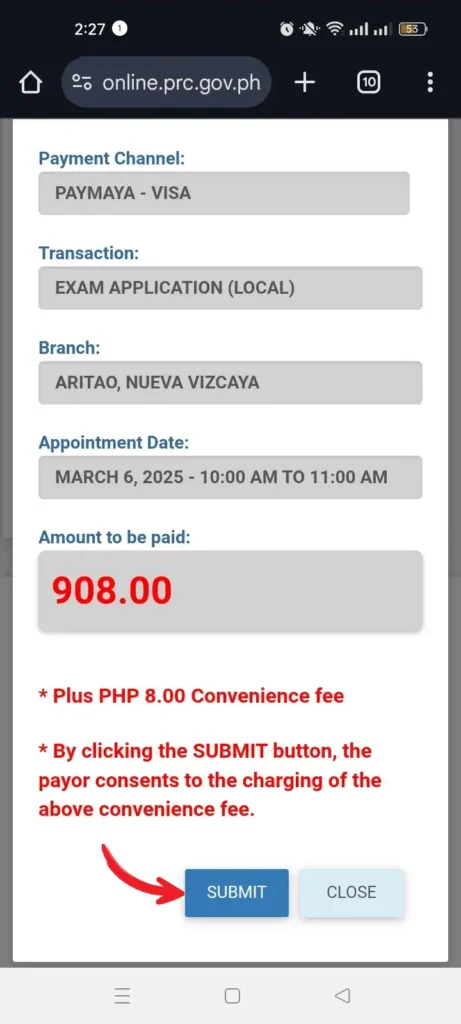
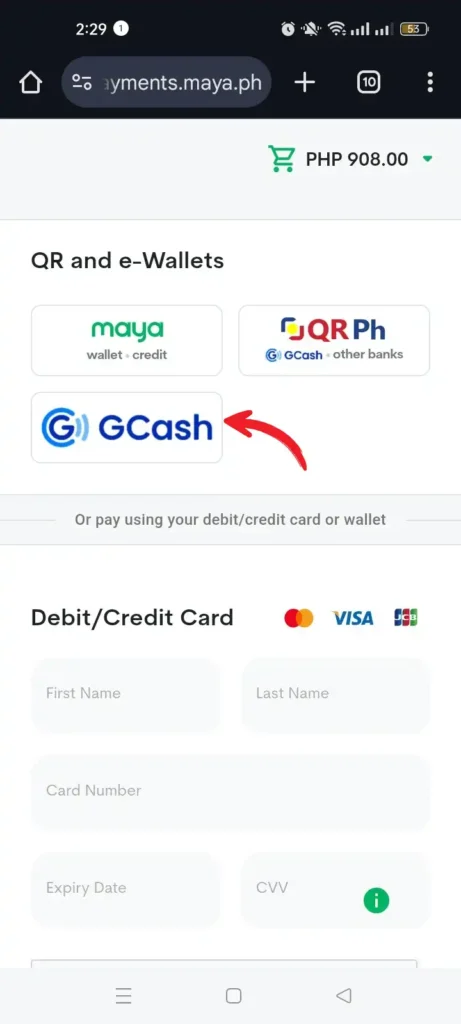
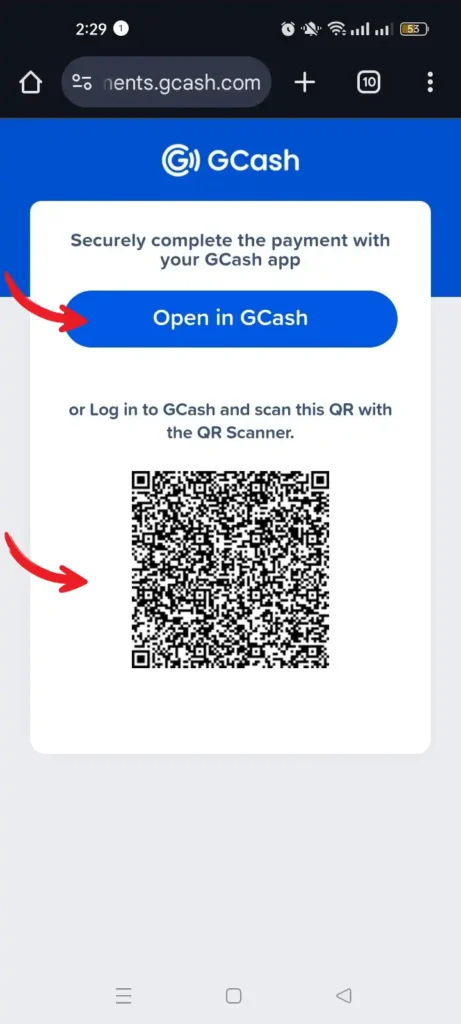
*Phone User: Swipe left to see the next photo
*Computer User: Click the arrow to see the next photo
Although LERIS intends to offer more payment methods soon, there are currently five available options.
Since most people prefer GCash, we’ll make use of it.
For a smooth transaction, ensure your GCash account has enough balance (Php 900 plus a Php 20 transaction fee).
To confirm the payment, simply reply with your 4-digit mobile PIN when you receive the SMS confirmation.
Step 7. Print your PRC examination application form
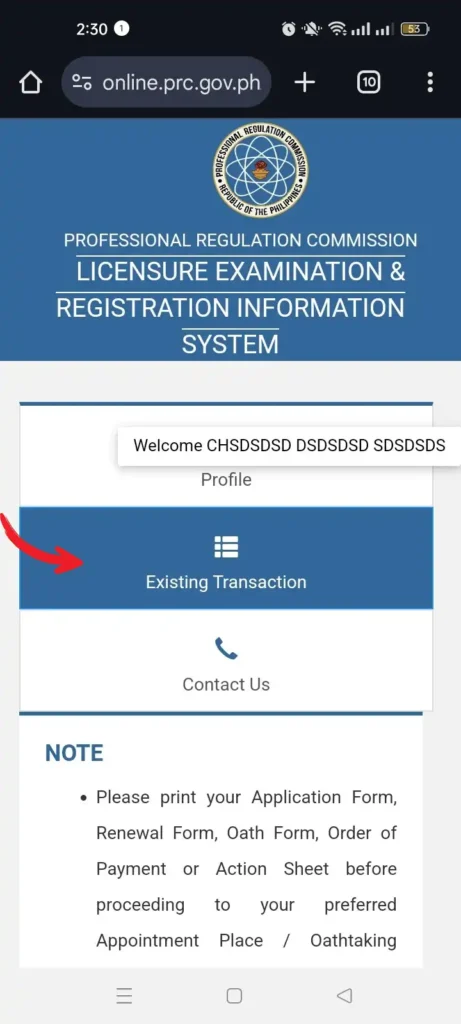
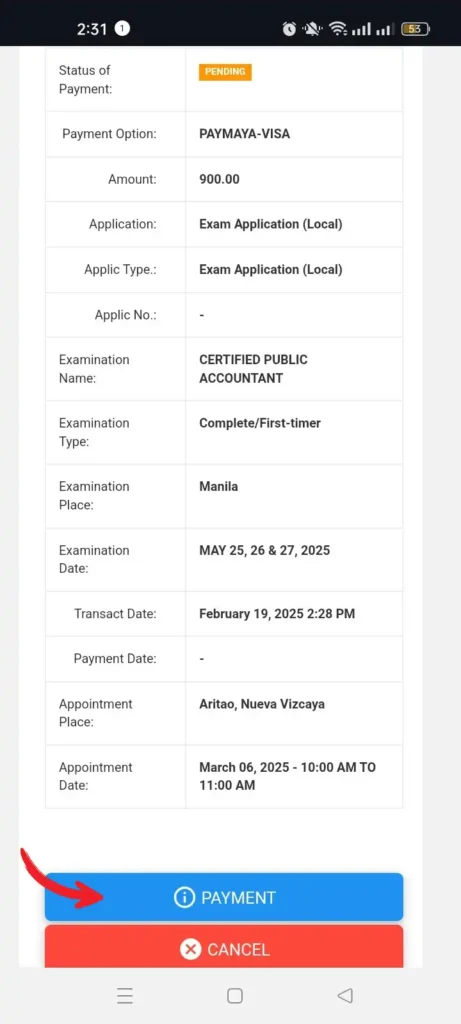
*Phone User: Swipe left to see the next photo
*Computer User: Click the arrow to see the next photo
Go to your profile page and select “Existing Transaction” from the main menu.
Click “Payment Details” to check if your online payment went through.Select “Print Document” to view your completed PRC exam application form.
Click the printer icon in the top-right corner to print it.
On your appointment day, bring the printed form, other required documents, and the application fee if you chose the PRC – CASHIER payment option.
If you face any technical issues, email PRC’s support team at prc.sple@gmail.com.
Step 8: Go to the PRC on your appointment date
Here’s what to expect on the day of your appointment:
- Pay for the documentary stamp: Head to the PRC Customer Service center and pay Php 21 per stamp.
- Submit your requirements: Go to the Processing Counter and submit your printed application form and other required documents. The Processing Officer will ask for your signature, thumb mark, and the documentary stamp. After reviewing your documents, you’ll get a Permanent Examination & Registration Record Card (PERRC). Fill it out right away.
- Buy a metered mailing envelope: Return to the PRC Customer Service center to purchase one for Php 30.
- Final submission: Submit the envelope, your processed application form, and all other requirements at the Issuance Counter. Wait for your name to be called.
- Receive your NOA: After your documents are evaluated, the issuing officer will give you your Notice of Admission (NOA) with the attached Program of Examination and metered mailing envelope.
✅ Done! Your PRC application is complete. Don’t forget to check the PRC website 2-3 days before your exam to find your room assignment.
CLE 2026 Schedule and Exam Program
When is the 2026 Criminology Licensure Examination?
First Exam ↓
| Date/s of Examination | February 04, 05, & 06, 2026 |
| Day/s | Wed, Thu, & Fri |
| Place/s | NCR, Baguio, Butuan, Cagayan de Oro, Calapan, Cebu, Davao, Iloilo, Koronadal, Legazpi, Lucena, Palawan, Pagadian, Pampanga, Rosales, Tacloban, Tuguegarao, Zamboanga, Bacolod, Bayambang, Bohol, Catarman, Cauayan, Dumaguete, Ilocos Norte, Ilocos Sur, Kidapawan, Lipa (Batangas), Nueva Vizcaya, Romblon, and Naga |
| Opening of Online Application | November 11, 2025 |
| Deadline of Filing of Application | December 29, 2025 |
| Target Date/s of release of Examination Results | March 13, 2026 |
Second Exam ↓
| Date/s of Examination | August 01, 02 & 03, 2026 |
| Day/s | Sat, Sun, & Mon |
| Place/s | NCR, Baguio, Butuan, Cagayan de Oro, Cebu, Davao, Iloilo, Koronadal, Legazpi, Lucena, Mati, Palawan, Pagadian, Pampanga, Rosales, Tacloban, Tuguegarao, Zamboanga, Antique, Bacolod, Bayambang, Bohol, Cauayan, Dumaguete, Ilocos Norte, Ilocos Sur, Kidapawan, Lipa (Batangas), Nueva Vizcaya, Santiago City, and Sablayan (Occidental Mindoro) |
| Opening of Online Application | April 17, 2026 |
| Deadline of Filing of Application | June 17, 2026 |
| Target Date/s of release of Examination Results | September 04, 2026 |
The Professional Regulation Commission (PRC) has officially announced the schedule for the upcoming Criminologist Licensure Exam (CLE).
The application period for the first exam of the year will run from November 11, 2025, to December 29, 2025. Meanwhile, the second exam’s application period will be open from April 17, 2026, to June 17, 2026.
The first set of exams is scheduled to take place on February 4, 5, and 6, 2026. The second set will be held earlier in the year, on August 1, 2, and 3, 2026.
Criminology Licensure Examination Program
First Exam ↓
| DATE AND TIME | SUBJECTS |
|---|---|
| February 4, 2026 (Wednesday) | |
| 7:00 A.M. – 7:45 A.M. | General Instructions/Filling out of Forms |
| 8:00 A.M. – 11:30 A.M. | Criminal Law and Jurisprudence |
| 1:30 P.M. – 4:00 P.M. | Law Enforcement Administration |
| February 5, 2026 (Thursday) | |
| 8:00 A.M. – 11:30 A.M. | Crime Detection and Investigation |
| 1:30 P.M. – 4:00 P.M. | Forensic Science |
| February 6, 2026 (Friday) | |
| 8:00 A.M. – 11:30 A.M. | Criminology |
| 1:30 P.M. – 4:00 P.M. | Correctional Administration |
Second Exam ↓
| DATE AND TIME | SUBJECTS |
|---|---|
| August 1, 2026 (Saturday) | |
| 7:00 A.M. – 7:45 A.M. | General Instructions/Filling out of Forms |
| 8:00 A.M. – 11:30 A.M. | Criminal Law and Jurisprudence |
| 1:30 P.M. – 4:00 P.M. | Law Enforcement Administration |
| August 2, 2026 (Sunday) | |
| 8:00 A.M. – 11:30 A.M. | Crime Detection and Investigation |
| 1:30 P.M. – 4:00 P.M. | Forensic Science |
| August 3, 2026 (Monday) | |
| 8:00 A.M. – 11:30 A.M. | Criminology |
| 1:30 P.M. – 4:00 P.M. | Correctional Administration |
CLE Application Requirements
What are the CLE Requirements?
To apply for the Criminology Licensure Examination (CLE), make sure you have the following:
- PSA Birth Certificate;
- PSA Marriage Contract (for married female applicants);
- Transcript of Records (TOR) with scanned picture and remarks “For Board Examination Purposes” (for both first-timers and repeaters);
- College Diploma with indication therein of date of graduation and SO Number (unless not required). In case of degree of equivalency, the college diploma and the certificate of equivalency issued by CHED;
- CHED Certificate of Authentication and Verification (CAV) for first timers;
- Valid NBI Clearance (for both first-timers and repeaters);
- Regional Trial Court (RTC) Clearance (for both first-timers and repeaters);
- Two (2) Certificates of Good Moral Character from any of the following: (First Timers and Repeaters) with the corresponding dry seal of the college, and the barangay where the applicant actually resides
- Barangay
- Dean of School;
- Other documents that the Board may reasonably require; and
- Payment: Php 900.00 – Complete.
After five (5) failures, whether consecutive or cumulative, REFRESHER COURSE, effective July 4, 2022 (Certificate of Completion as evidenced by TOR for Repeaters).
Feel free to post any comments or reactions related to this article in the section below.
Disclaimer: The information on Board Passers Portal (BPP), including exam results, news, and announcements, is for general information only. For official and verified details, please visit the Professional Regulation Commission (PRC) website and follow their official pages. For the full disclaimer, visit our Disclaimer Page.
References
- List of Requirements | Professional Regulation Commission. (n.d.). Www.prc.gov.ph. https://www.prc.gov.ph/list-of-requirements
- 2026 Schedule of Examination | Professional Regulation Commission. (2026). Www.prc.gov.ph. https://www.prc.gov.ph/2026-schedule-examination
Leave a Reply